
ChatGPT Ads are now available, giving businesses a new way to reach people while they are researching products, comparing options, or getting closer to a purchase decision. If you’re searching for how to run ChatGPT ads, the process involves more than creating an ad and setting a budget. You’ll need to set up your Ads Manager account, choose your primary country and currency, complete business or individual verification, build your campaign and ad groups, define context hints, upload the right creative, and connect your landing page.
The setup also differs from platforms such as Google Ads and Meta Ads, particularly in how ads are matched to conversations. This guide walks you through how to run ChatGPT ads step by step, while also covering the AI search visibility side of advertising on ChatGPT.
Quick Summary – How to Run ChatGPT Ads
- ChatGPT Ads let businesses reach users while they are actively researching, comparing, and evaluating solutions.
- Successful campaigns depend on strong context hints, relevant ad copy, and closely matched landing pages.
- You can manage campaigns through ChatGPT Ads Manager, including budgets, ad groups, creatives, targeting, and performance tracking.
- Measuring performance at the ad group and ad level helps identify what is driving clicks and conversions.
- Addlly AI can manage the entire ChatGPT advertising process end to end, while its GEO Audit helps improve your organic AI search visibility.
What You Need Before Running ChatGPT Ads
Before you start setting up your first ChatGPT ad campaign, have the basic account and campaign information ready. The setup is fairly straightforward, but a few requirements can slow you down if you leave them until the last minute.
You’ll need:
- An Ads Manager account
- A primary country and currency for your advertising account
- Business or individual verification documents
- Your business details, if you’re advertising as an enterprise
- Ad copy and a clear value proposition
- A landing page URL
- Your target geographies
- A campaign objective
- Your advertising budget
- Logo in the format of 128 by 128 pixels
- An ad creative in the required 256 × 256 px format
- Conversion tracking details if you plan to measure leads or sales
You should also have a clear idea of who you want to reach and the conversations where your ad would make sense. This becomes particularly important when you start working with context hints because ChatGPT Ads use conversational relevance rather than traditional keyword targeting.
Once these basics are ready, you can move into the account setup and verification process.
Step 1: Create Your ChatGPT Ads Account
To start running ChatGPT ads, you first need access to the ChatGPT Ads Manager. This is the self-serve platform where you’ll create campaigns, manage ad groups, set budgets, upload creatives, and monitor how your ads perform. If you already work with platforms such as Google Ads or Meta Ads, the overall setup will feel familiar, although the campaign options are designed around advertising within ChatGPT.
When creating your account, keep your business information consistent with the details you’ll use during verification. You’ll typically need to have the following ready:
- Your business or individual email account details
- Business information, if you’re advertising as an enterprise
- Contact information
- Billing information
- Verification documents
- Your preferred primary country and currency
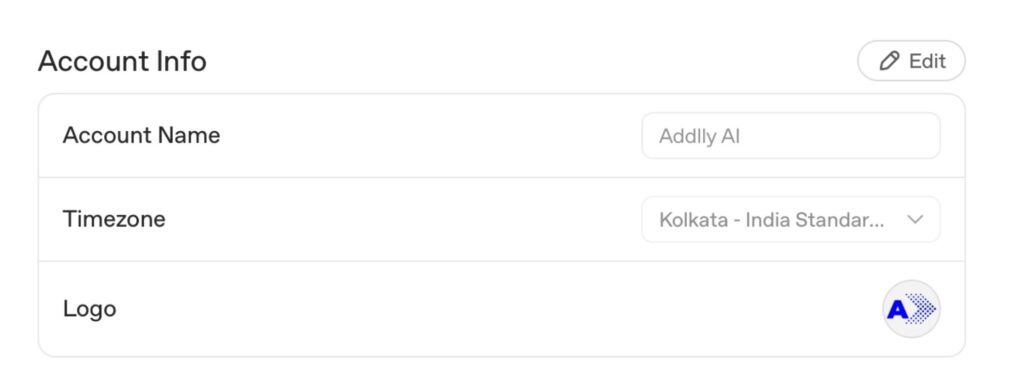
Once your account details are entered, you’ll need to complete the advertiser verification. Choose the appropriate advertiser type based on whether you’re setting up the account as an individual or a business.
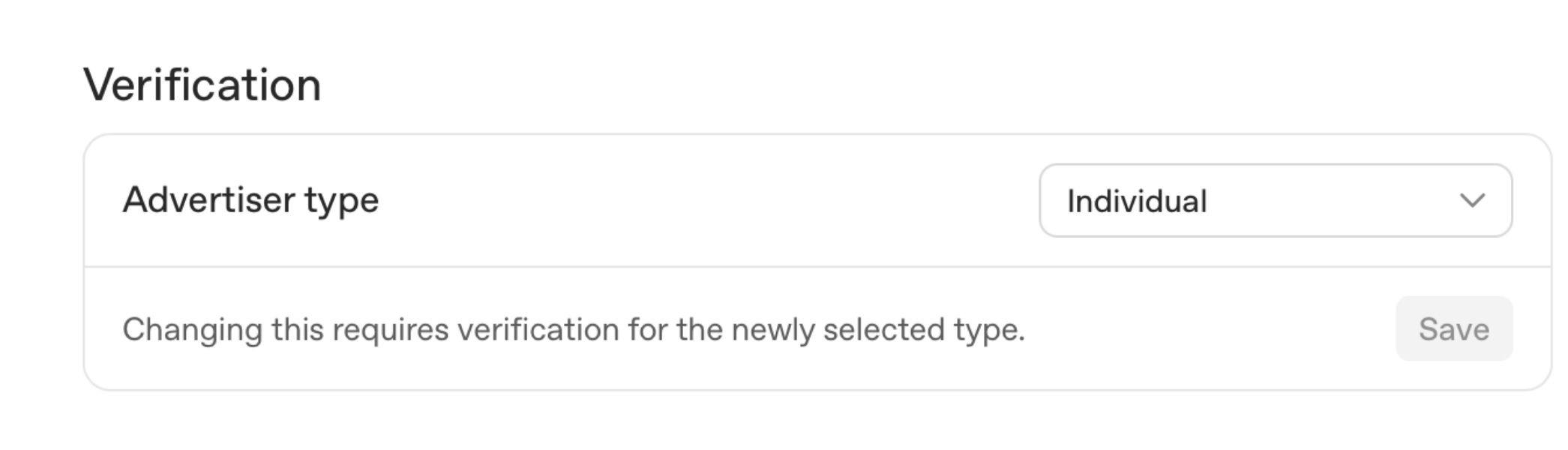
For an individual account, you may need to provide an identity document such as a National ID or driver’s licence. Businesses and enterprises may need to provide their business details for verification. Currently, only these two account formats are available.
For those companies looking to delegate their ad planning and execution to an agency, then they can add the users with different roles in the account settings.
Once your Ads Manager account is created and verified, you can move on to building your first campaign. Having your business details and verification documents ready can make this part of the process much smoother.
If you’re also working on organic visibility in ChatGPT, it helps to understand how to rank your website on ChatGPT because paid placements and organic visibility follow different paths.
Step 2: Select Your Primary Country and Currency
After creating your ChatGPT Ads Manager account, you’ll be asked to select the country you want to use as your primary market. This choice determines the primary country and currency associated with your account. You can then select the additional geographies where you want your ads to appear.
- Select your primary country.
- Confirm the currency for the account.
- You can add the countries where you want to serve your ads at the ad stage.
- Review your country targeting before continuing.
- Make sure your selected markets match where you currently sell or operate.
One useful part of the setup is that you can serve the same ad across multiple geographies, so you don’t necessarily need to create separate ads for every country. Your country targeting can instead be handled as part of the campaign setup, allowing the same ad creative to appear in relevant conversations across different markets.
When deciding which markets to include, consider the user intent behind the conversations you want to reach. Conversational search queries and keywords for GEO content can help identify how people phrase their needs and the types of questions they ask when researching products or services.
Step 3: Verify Your Business or Individual Account
Before you can move ahead with your ChatGPT ad campaigns, you’ll need to verify whether you’re advertising as an individual or on behalf of a business. This verification helps the ad platform establish who is responsible for the ads and ensures that the account details are tied to a legitimate advertiser.
The information you submit depends on the type of account you choose:
- Individual account: You may need to provide proof of identity, such as a National ID or driver’s licence.
- Business account: You’ll need to provide your business details and any documentation requested for verification.
- Make sure the information matches the details associated with your Ads Manager account.
- Complete the verification before building out your campaign.
Once your account is verified, you can continue setting up your ChatGPT Ads campaign. Keeping your business information consistent is particularly important when you plan to run ads across multiple markets.
The same attention to consistency applies when you measure brand visibility in AI search, where how your business is represented across different sources can influence how AI systems understand and mention your brand.
Step 4: Create Your ChatGPT Ads Campaign
If you’re wondering how to run ChatGPT ads, this is the stage where you create your first campaign in Ads Manager. Your campaign determines what you want to achieve, how much you want to spend, and which markets you want to reach.
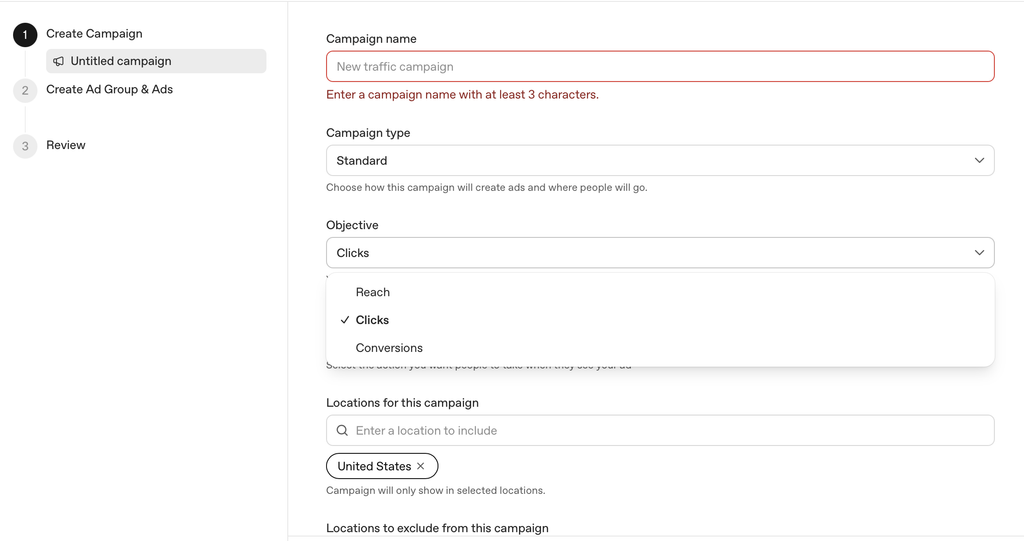
When you select Create Campaign, you’ll work through the main campaign settings, including:
- Give your campaign a clear name.
- Select your campaign objective based on whether you want reach, clicks, or conversions.
- Set your campaign budget and ad spend.
- Choose the countries or geographies where the ads should appear.
- Set up your ad group and related targeting.
- Review the campaign structure before moving to the ad creation stage.
The campaign structure follows a simple Campaign → Ad Group → Ad variations. Keeping this structure organized becomes particularly useful when you create multiple ad groups for different audiences, products, or conversation themes. You can then compare how different groups perform instead of putting every audience into a single campaign.
If you’re familiar with Google Ads or Meta Ads, some of the campaign setup will feel familiar. The difference becomes more apparent when you define the conversational context in which your ads should appear. This makes campaign structure important for ChatGPT advertising, particularly when you’re trying to reach users with specific commercial intent.
A clear campaign structure can also support a broader GEO strategy by keeping paid advertising separate from the work involved in improving a brand’s visibility in AI-generated answers.
Step 5: Choose Your Campaign Objective
After creating your campaign, you need to decide what you want your ChatGPT ad campaigns to accomplish. Your campaign objective affects how the platform optimizes delivery, so choose the option that matches the outcome you actually care about.
Depending on your goal, you can focus on:
- Reach: Useful when your priority is getting your brand in front of more people.
- Clicks: Suitable when you want to drive traffic to your landing page.
- Conversions: Better suited to campaigns focused on leads, sign-ups, purchases, or other measurable actions.
Think about the action you want someone to take after seeing the ad. Users engaging with ChatGPT are often in research or decision-making phases, so matching the campaign objective with that intent can help you avoid optimizing for clicks when your real goal is generating conversions.
This is also where ChatGPT advertising starts to differ from traditional Google Search Ads. Google Ads can be built around explicit search queries and keyword intent, while ChatGPT ads are selected based on conversation context and relevance. That makes it important to consider what the user is trying to accomplish when choosing your objective.
Once you’ve selected the objective, the next part of how to run ChatGPT ads is setting up the ad group and defining the context in which your ad should appear.
For teams trying to understand performance beyond individual campaigns, KPIs to track for GEO and AEO can provide a useful framework for measuring visibility across AI search.
Step 6: Select Your Target Geographies
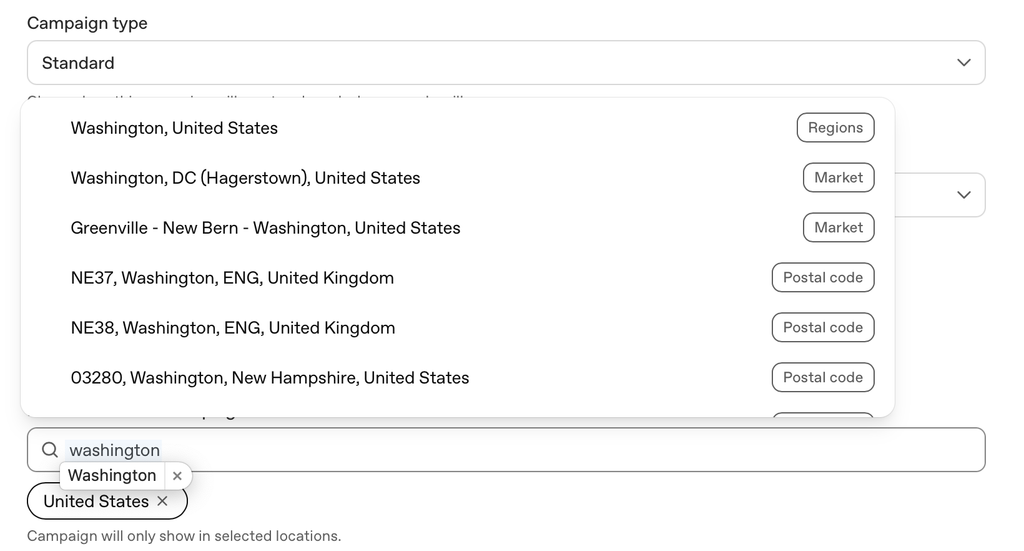
Your geographic targeting should reflect where your business actually operates and where there is demand for your product or service. Keep the following in mind:
- Select the countries you want to target.
- ChatGPT ads allow you to target very precise geo targeting.
- Make sure the selected locations align with your business availability.
- Consider differences in language, market demand, and commercial intent.
- Use the same ad across multiple geographies when the offer and messaging are relevant to each market.
- Review your locations before moving to the ad group level.
The key is relevance. Ads are selected based on conversation context and relevance, so targeting a country alone does not determine whether an ad shows. Your audience, context hints, ad copy, and landing page should make sense for the people you’re trying to reach.
For example, a campaign targeting users in Singapore could use different messaging from one targeting users in India, even when the underlying product and ad creative remain the same.
Once your locations are set, you can move into the ad group, where you start defining the conversations and user scenarios you want your ads to match.
Step 7: Create an Ad Group
Now that you’ve selected your target geographies, it’s time to create your first ad group. This is where you organize the audience, context, and messaging you want to associate with a particular part of your campaign.
If you’re learning how to run ChatGPT ads, think of the ad group as the layer where you tell ChatGPT what kind of conversations your ad is relevant to. You can create separate ad groups when you have different products, audiences, or customer needs to target.
- Give the ad group a descriptive name.
- Keep each ad group focused on a specific audience, product, or theme.
- Add relevant context hints at the ad group level.
- Use multiple ad groups when the user intent differs significantly.
- Keep the landing page relevant to the ad group’s intended audience.
A focused structure also makes it easier to see which groups perform well and which ones need adjustment. For example, a B2B software company could create separate ad groups for people researching CRM software, comparing sales tools, and looking for ways to automate their sales process. Each group can then use different context hints and messaging while remaining part of the same campaign.
This approach is different from relying on exact match targeting rules in traditional search advertising. ChatGPT uses conversation context to determine whether an ad is a relevant match, so the scenarios you define at the ad group level matter.
The same principle applies when creating content for AI search, where content structure for AI engines can make it easier for systems to understand the questions, topics, and intent covered on a page.
Step 8: Add Context Hints for Targeting
Context hints tell ChatGPT what type of conversation your ad should be relevant to. Think of them as the ChatGPT Ads equivalent of the targeting logic you would build around keywords and search intent in Google Ads.
The difference is that you aren’t giving ChatGPT a list of keywords to match exactly. Instead, you describe the user’s situation, need, or intent.
For example, if you were running Google Search Ads for project management software, you might target searches such as:
- best project management software
- project management tools for teams
- software to manage project deadlines
- project collaboration tools
In ChatGPT Ads, you can turn that same search intent into a descriptive context hint:
“People comparing project management tools to organize tasks, deadlines, and collaboration across multiple teams.”
This gives ChatGPT a clearer picture of when your ad could be useful.
When writing context hints:
- Start with the user’s intent, not your product name.
- Describe the problem or task the user is trying to solve.
- Include the type of solution they may be researching.
- Use natural language instead of keyword lists.
- Keep each hint closely related to the ad group’s theme.
- Create separate hints when the same product serves different user needs.
For example, a project management platform could have separate ad groups for team collaboration, project planning, and task management, with context hints tailored to each one.
The goal is to give ChatGPT enough context to identify a relevant match within a conversation. The more clearly your hint describes the user’s scenario, the easier it is to connect your ad with the right type of conversation.
This is also why context hints shouldn’t simply repeat your target keyword. They should capture the broader intent behind the search, similar to how you would think about search intent when building a Google Ads campaign.
This focus on relevance also connects with broader AI search ranking factors, where context and intent influence how information is surfaced by AI systems.
Step 9: Write Your Ad Copy
Once the ad group and context hints are set, you can create the actual ChatGPT ad. This is where you explain what your brand offers and give the user a reason to click.
Keep the copy short and specific. Since the ad appears alongside an AI-generated response, the headline should quickly communicate the value of your offer without sounding like a generic display ad.
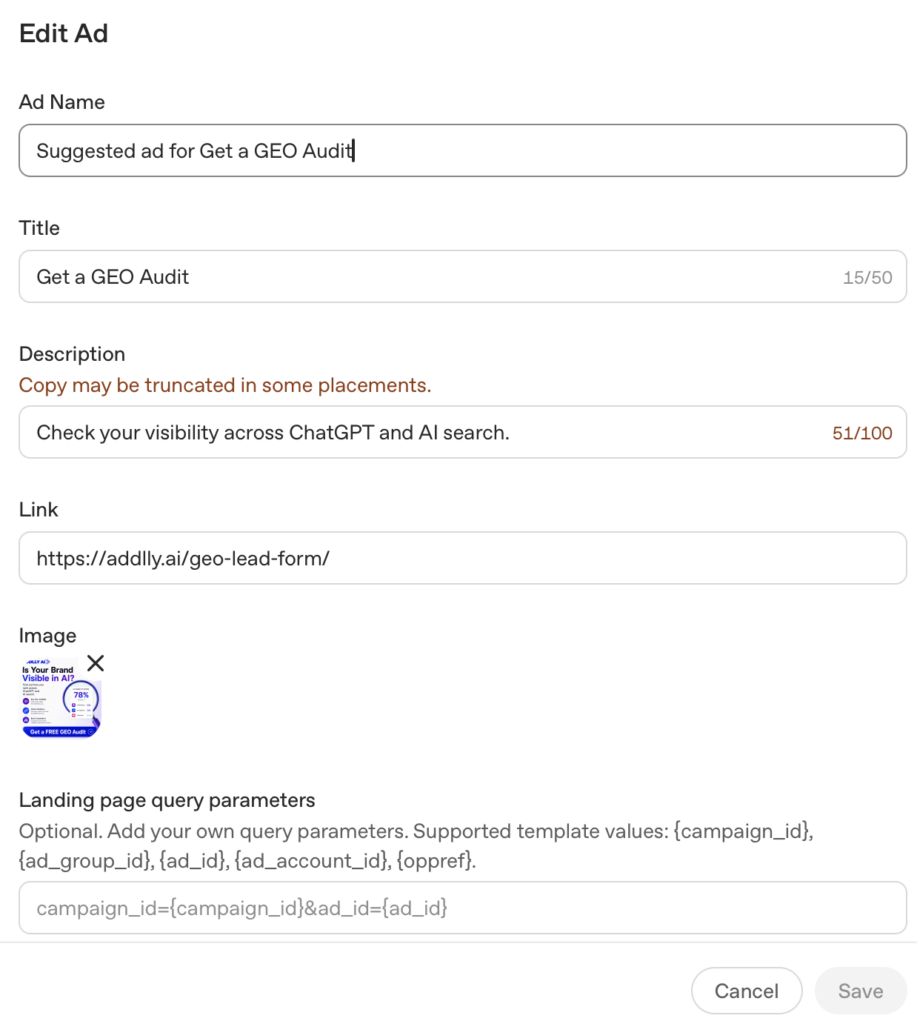
A simple structure is:
- Brand name: Your company or product name
- Headline: The main benefit or offer
- Description: A short explanation that adds context
- Image: Your supporting visual
For example, if you are advertising an AI marketing platform:
Headline: Create SEO Content Faster With AI
Description: Plan, create, optimize, and publish content from one AI marketing platform.
The headline should focus on the value proposition, while the description gives enough information for someone to understand what they will get after clicking.
Keep the ad relevant to the conversation
Your ad copy should make sense for the types of conversations described in your context hints. If the ad group targets people comparing AI content tools, for example, the ad should speak to that need rather than making a broad statement about your entire product.
This also gives you room to create multiple ads within the same ad group. You can test different headlines, benefits, and descriptions while keeping the underlying audience intent similar.
Avoid claims that could make users believe ChatGPT itself recommends or endorses your product. The ad should clearly represent your brand as an advertiser.
A useful way to think about the copy is:
User need → Product benefit → Clear next step
That keeps the ad copy focused while giving ChatGPT enough information to determine when the placement is relevant.
Step 10: Upload Your Ad Creative
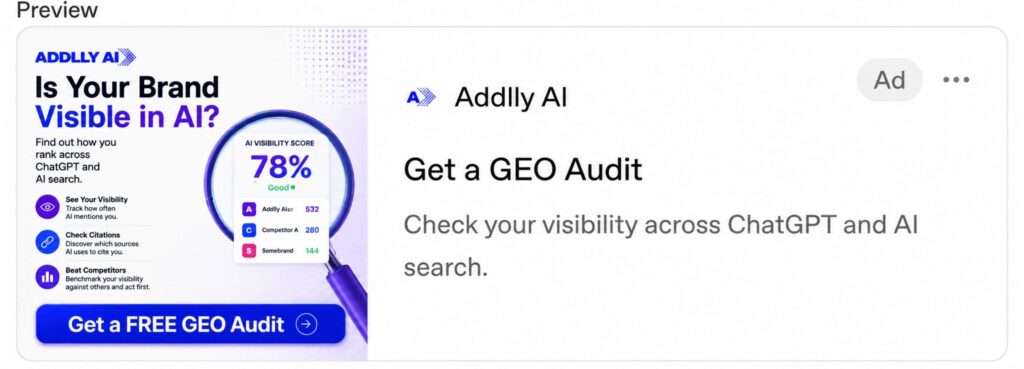
The next step is to add the visual that will appear with your ChatGPT ad. OpenAI’s ad format includes the brand name, favicon, headline, description, and image, so the creative should support the message rather than compete with it.
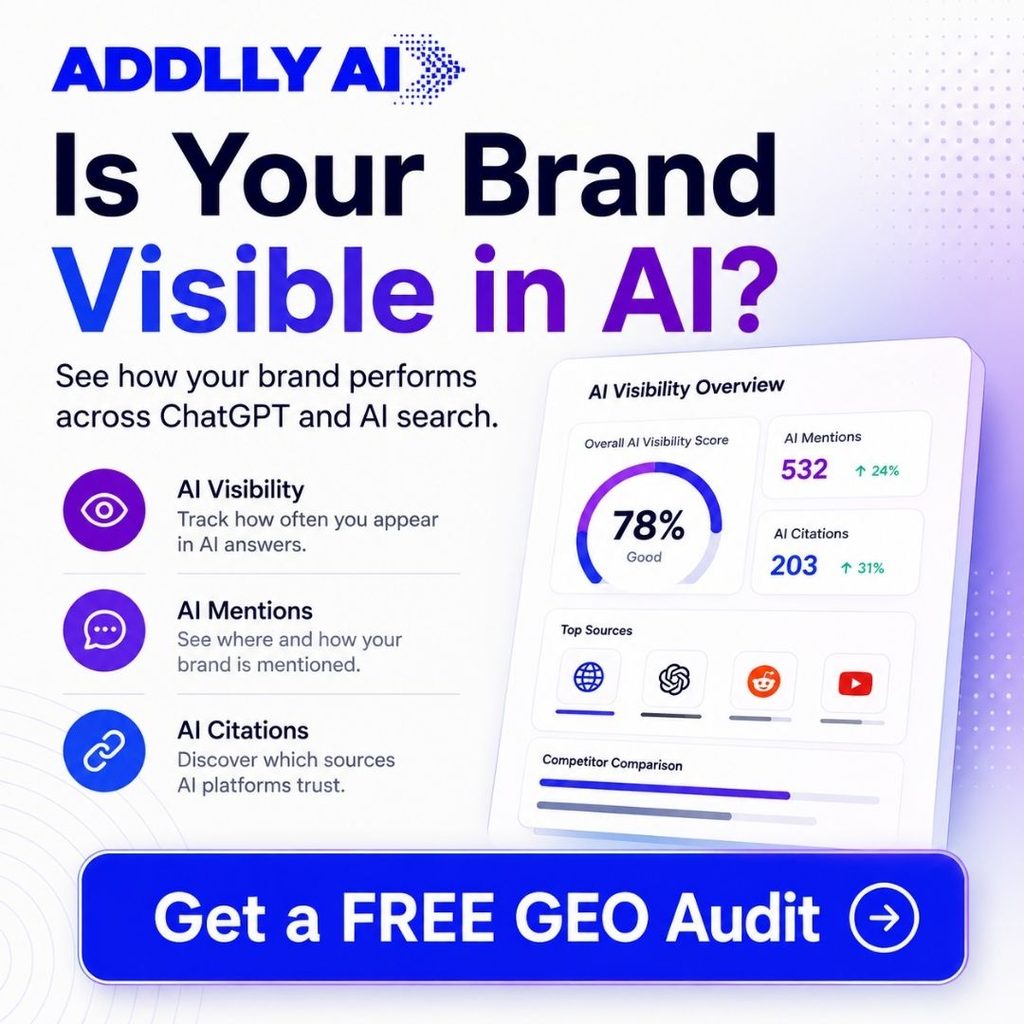
For the image, keep these points in mind:
- Use a 256 × 256 pixel image.
- Make sure the visual is clear at a small size.
- Keep text inside the image to a minimum.
- Use branding that is easy to recognize.
- Make the creative consistent with the landing page and ad copy.
- Avoid visuals that could make the ad look like part of the ChatGPT response.
For example, if your ad promotes an AI marketing platform, the creative could show the product interface or a simple branded visual that reinforces the main benefit from the headline.
Match the creative to the ad
Your ad creative, headline, description, and landing page should tell the same story. If the headline promises a specific feature but the image and landing page focus on something completely different, the user experience becomes confusing.
This is particularly important for ads in ChatGPT, where users are already engaged in a specific conversation. The ad should feel relevant to that context while remaining clearly identifiable as a paid placement.
OpenAI also requires ads to follow its advertising policies, including restrictions around misleading claims, sensitive categories, and content that could compromise user trust.
Step 11: Add Your Landing Page URL
After adding the ad copy and creative, you need to provide the landing page URL where users will go after clicking the ad.
This part deserves more attention than it might seem. Landing page relevance matters because the page should deliver what the ad promised. If your ad talks about a specific product, feature, offer, or use case, the landing page should take the user directly to that information.
For example, if your ad says:
“Compare AI SEO tools for your marketing team”
the landing page should take the user to a page about comparing or evaluating those tools, rather than a generic homepage.
When adding your landing page:
- Use the most relevant page for the specific ad.
- Make sure the page works properly on desktop and mobile.
- Keep the headline and offer consistent with the ad.
- Avoid making users search for the product or information mentioned in the ad.
- Check that the page loads correctly before launching.
- Add UTM parameters if you want more detailed campaign attribution.
Why landing page relevance matters
When ChatGPT ads work well, the ad, conversation context, and destination page feel connected. Someone reading an answer and seeing your sponsored placement should immediately understand why the ad is relevant to what they are researching.
This is also where your broader digital marketing strategy comes into play. The landing page should support the same topic and intent that brought the user to your ad in the first place.
If you’re building pages around AI discovery, the same principle applies to getting ChatGPT to find and mention your brand: the content and destination experience need to clearly reinforce what you want users and AI systems to understand about your brand.
Step 12: Review Your Ad Before Launching
Before you launch, review the complete campaign setup. This is where you can catch small issues that may affect performance once your ChatGPT ads launched status goes live.
Check these elements together:
- Ad group: Does the ad belong to the right audience scenario?
- Context hints: Do they clearly describe the user’s situation or intent?
- Ad copy: Is the value proposition easy to understand?
- Logo: Is it 128 by 128 pixels
- Creative: Does the 256 × 256 image support the message?
- Landing page: Does it match what the ad promises?
- Brand details: Is your brand name and visual identity correct?
- Destination URL: Does the page open properly?
- Campaign objective: Does it match what you want to achieve?
Make sure the ad fits the ChatGPT experience
Your ad should be visually separated from the organic answers ChatGPT provides. Users should be able to recognize that they are looking at a sponsored placement from an advertiser rather than part of the AI-generated response.
This is particularly important for user trust. Avoid copy or creative that could make users think ChatGPT recommends, endorses, or guarantees your product. The ad should represent your business independently of the ChatGPT response around it.
It is also worth looking at your wider AI presence before putting more ad spend behind a campaign. If competitors are already appearing more frequently in relevant AI conversations, that can provide useful context for your paid strategy. You can compare your AI visibility against competitors to identify where your brand currently stands.
After uploading, it will look like the image below:
Step 13: Set Your Campaign Budget
The next step is setting your budget and bidding strategy in ChatGPT Ads Manager.
Your available options depend on the campaign objective. For example, CPC is suitable when you want to drive clicks to your website, while CPM is more focused on impressions.
When setting the budget, consider:
- Your campaign objective
- The countries you want to target
- How much you can allocate for the initial test
- Whether you want to optimize for clicks or conversions
For ChatGPT ads cost, there isn’t one fixed price. Your actual cost can vary depending on your bid, competition, campaign objective, and delivery.
If you’re testing ChatGPT advertising for the first time, start with a budget that gives the campaign enough room to collect useful data. You can then adjust your ad spend based on how the campaign performs rather than committing a large budget immediately.
Step 14: Launch Your ChatGPT Ad Campaign
Once your campaign settings, ad groups, creatives, and landing page are ready, you can submit the campaign for review and launch it.
Before launching, quickly check:
- Your business or individual account is verified.
- Billing and payment details are complete.
- The correct countries are selected.
- Your ads follow OpenAI’s advertising policies.
- Your landing page URL works properly.
- Your campaign objective and budget are correct.
Once approved, your ChatGPT ads launched status will become active and the ads can begin serving in eligible conversations.
Remember that ads are visually separated from ChatGPT’s organic responses and clearly identified as sponsored placements. They don’t change or alter ChatGPT’s responses, and advertisers don’t control what appears in the AI-generated answer.
Once everything is ready, you can launch the campaign through OpenAI’s Ads Manager and monitor its status as it moves through the review process.
How to Measure and Optimize Your ChatGPT Ads
Once your ChatGPT ads are live, use Ads Manager to see which campaigns, ad groups, and ads are performing best.
| Metric | What it tells you |
|---|---|
| Impressions | How often your ad was shown |
| Clicks | How many users clicked |
| CTR | How effectively the ad generates clicks |
| CPC | Average cost per click |
| Conversions | Actions completed after the click |
Look at the Ad Group Level
Each ad group represents a specific theme or user intent, making it useful for comparing performance.
| Ad Group | CTR | CPC | Conversions |
|---|---|---|---|
| AI SEO Tools | 3.1% | $3.20 | 38 |
| Content Automation | 2.2% | $3.80 | 24 |
| AI Marketing Platforms | 1.4% | $4.30 | 11 |
In this example, AI SEO Tools is performing best. You could investigate its context hints, ad copy, and landing page and consider giving that ad group more budget.
You can also compare individual ads within each group and create more variations around the messages that perform well.
Optimize for Results, Not Just Clicks
A low CPC doesn’t necessarily mean an ad is successful. Look at the complete journey:
Impression → Click → Landing Page → Conversion
Use UTM parameters and conversion tracking to understand what happens after the click. Then adjust your ad groups, context hints, ad copy, creative, or budget based on the results.
The goal is to find the combinations that bring the right users to your business, not simply generate the most clicks.
How Addlly AI Can Help
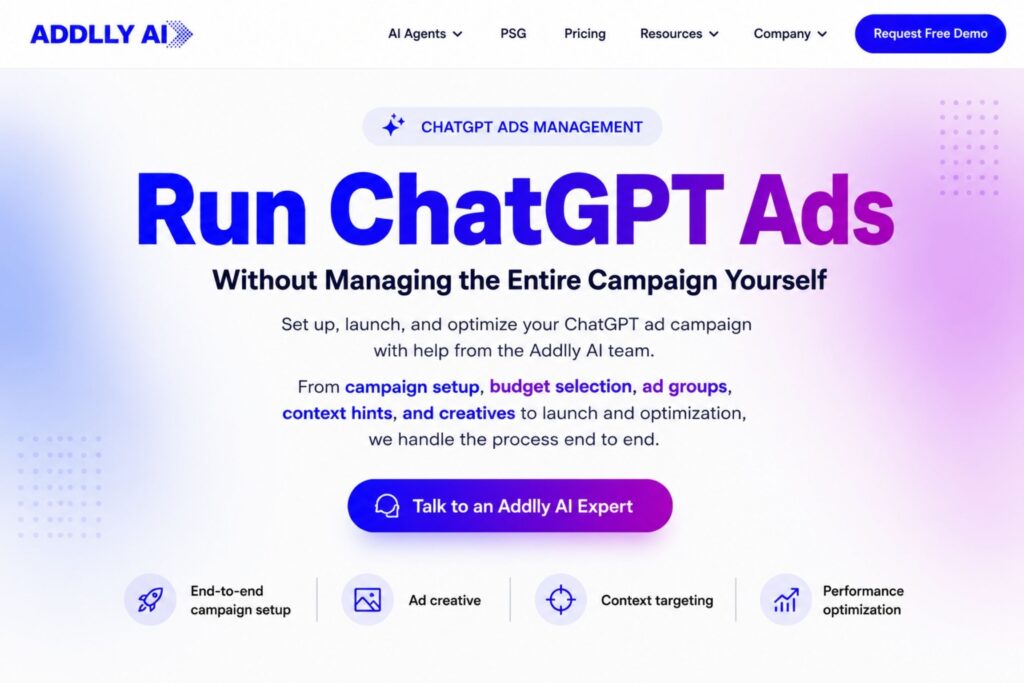
Knowing how to run ChatGPT ads is only one part of building visibility in AI search. Managing the campaign properly, from setup and targeting to creative, budgeting, launch, and optimization, can also take significant time and expertise.
This is where the Addlly AI team can help. You can have Addlly AI manage your ChatGPT advertising end to end on your behalf, including setting up the campaign, choosing the right budget, creating ad groups, defining context hints, preparing creatives and ad copy, launching the ads, and monitoring and optimizing performance.
At the same time, Addlly AI’s GEO Audit can show your current AI search positioning, including brand citations, competitor visibility, citation sources, and areas where your brand is missing from relevant AI responses.
So you don’t have to choose between paid and organic AI visibility. Addlly AI can help you run the ads while also identifying opportunities to strengthen how your brand appears in AI-generated answers.
FAQ – How to Run ChatGPT Ads
How Much Should I Budget for My First ChatGPT Ad Campaign?
ChatGPT Ads have a minimum daily budget that varies by market. The minimum is $25 per day in the U.S. and ₹750 per day in India. Beyond the minimum, choose a budget that gives you enough impressions, clicks, and conversion data to evaluate performance before increasing your ad spend.
Can the Same ChatGPT Ad Reach Users in Different Countries?
Yes. You can select the countries where you want your campaign to serve, and the same ad can be eligible to appear across multiple selected geographies.
Are ChatGPT Ads Based on Traditional Keyword Targeting?
No. ChatGPT uses contextual signals and context hints rather than traditional exact-match keyword targeting. Your hints should describe the user’s situation, needs, or intent.
Can Advertisers See Users’ ChatGPT Conversations?
No. Advertisers don’t receive users’ private conversations or personal details through ChatGPT Ads. Ad selection can use relevant conversational signals while maintaining privacy protections.
Will Sponsored Placements Change the Answers ChatGPT Gives?
No. Sponsored placements appear separately from the AI-generated response. Advertisers cannot alter ChatGPT’s responses through their ads.
How Can Addlly AI Help With ChatGPT Advertising?
The Addlly AI team can handle your ChatGPT advertising end to end, from setting up the ad account and campaign to choosing the right budget, creating ad groups and creatives, defining context hints, launching the ads, and optimizing performance. You also get a GEO Audit to understand your brand’s AI visibility, citations, and competitor positioning.

