
How to Run an SEO Audit on Your Site with Addlly AI
Addlly AI’s SEO Audit Agent helps you understand how your site is performing in search by analyzing all URLs across your website. Instead of checking pages one by one, the audit connects to your Google Search Console data and reviews your existing site content at scale, including blog posts, event pages, and partnership content.
The goal is to show you where to focus first. Once the audit is complete, Addlly AI categorizes your URLs by the action they require and prioritizes them by impact. This gives you a clearer path to improving SEO performance without spending time guessing which pages to review, rewrite, or leave alone.
This guide walks through how to run your site SEO audit in Addlly AI and how to use the results to move into the SEO Rewrite Agent.
Why Do You Need an SEO Audit?
An SEO audit helps you understand what may be limiting a page’s search visibility and what to improve first. It gives you a clearer view of how your content is structured, where it may be too thin, and which gaps could be affecting performance.
An audit can help you:
- Identify underperforming URLs across your website
- Spot outdated content that no longer adds value
- Prioritize pages that are most likely to improve traffic if updated
- Avoid wasting time on pages that are already performing well
These findings give you a starting point for updates. They can also support a stronger content foundation for AI visibility by improving clarity, structure, and topical coverage across your site.
How Do You Run Your SEO Audit With Addlly AI?
1. Log in to Your Addlly AI Dashboard
Start by opening your Addlly AI dashboard. This is where you can access the SEO Audit Agent and review your site-wide results once the scan is complete.
2. Launch the SEO Audit Agent
Select the SEO Audit Agent and click Launch Agent. This is the starting point for analyzing your site’s existing URLs and identifying where SEO improvements are most needed.
The SEO Audit Agent connects to your Google Search Console data to evaluate your site based on actual search performance. This allows Addlly AI to work from real URL-level signals rather than relying solely on static page checks.
3. Let Addlly AI Analyze Your Site URLs
Once connected, the audit scans your website and analyzes URLs throughout it. This includes content such as:
- blog posts
- event pages
- partnership content
- other indexable site pages
Rather than focusing on one page at a time, the SEO Audit Agent gives you a broader view of how your content library is performing.
4. Review How Each URL Is Categorized
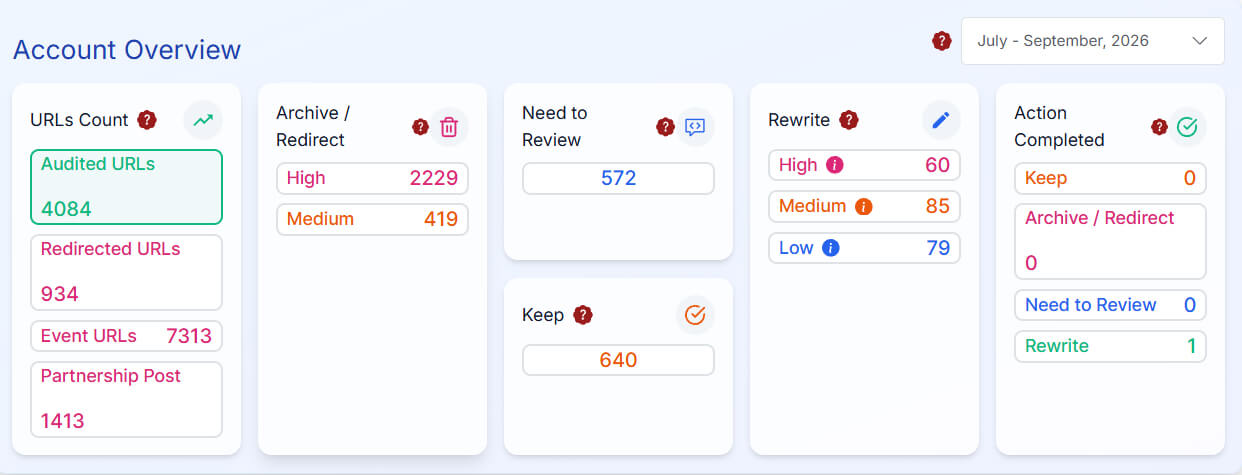
After the audit runs, each URL is grouped into one of four action categories:
- Archive / Redirect: outdated content that no longer drives traffic and may be reducing overall site quality
- Need to Review: lower-performing pages that need a decision on whether to improve, keep, or remove
- Rewrite: pages that should be rewritten and optimized to improve rankings
- High-Performing: pages that are performing well and do not need changes
This helps you understand not just what exists on the site, but what should happen next for each page.
5. Use Priority Levels to Decide What to Fix First
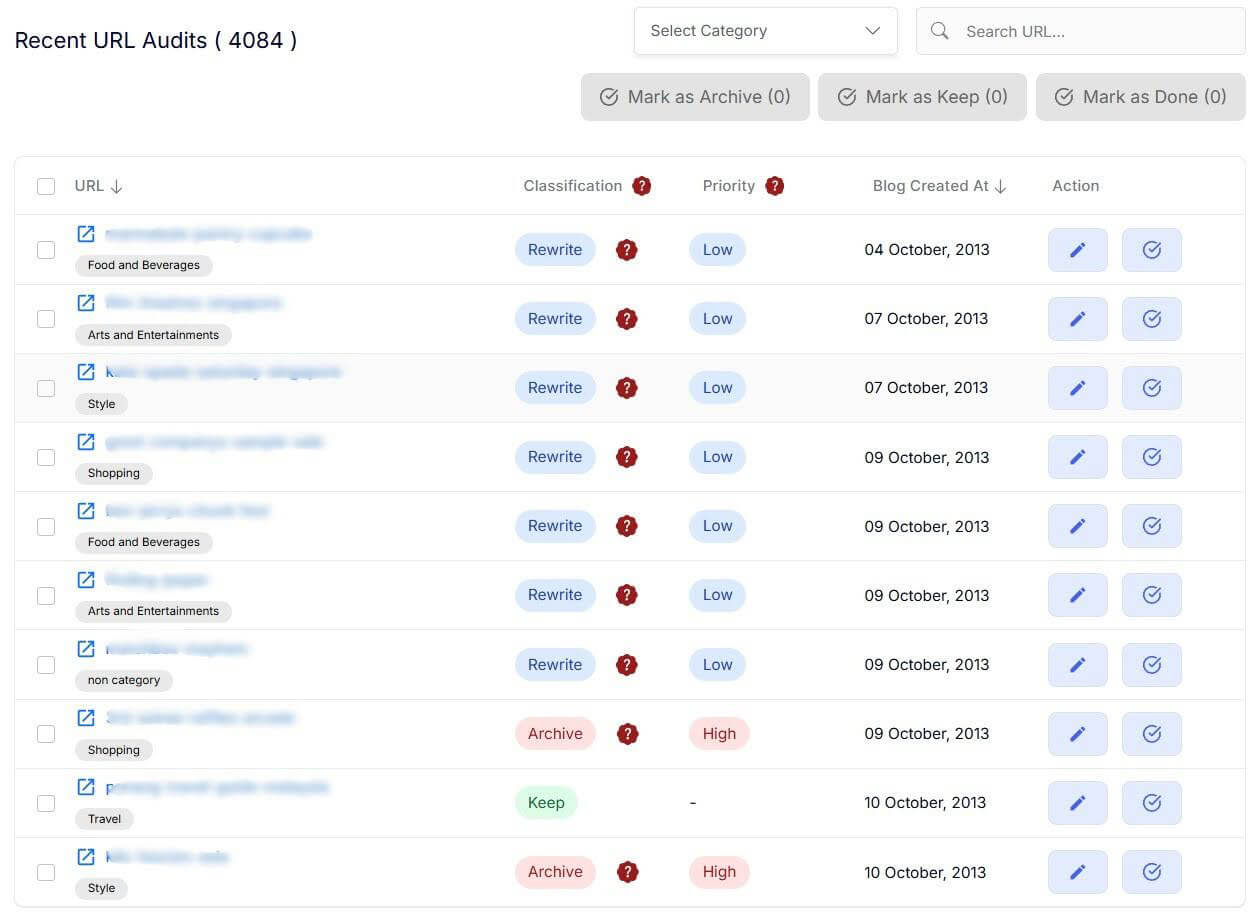
In addition to category labels, each URL is also assigned a priority level of High, Medium, or Low.
This makes it easier to focus your efforts where they are most likely to improve SEO performance and traffic. Instead of working through the site randomly, you can begin with the pages that matter most.
6. Move Into the SEO Rewrite Agent
Once the audit is complete and your priority pages are clear, switch to the SEO Rewrite Agent.
This is the next step for pages marked for rewriting or improvement. The rewrite workflow helps rebuild underperforming pages with stronger structure, keyword alignment, metadata, and schema so they are better positioned to rank.
How Does Addlly AI Help You Act on Audit Findings?
The audit is only the starting point. Addlly AI also helps you turn those findings into actual improvements without switching between separate systems.
After the audit, you can use Addlly AI to:
- Identify what needs attention first: the SEO Audit Agent shows which issues are affecting visibility
- Update weak sections more quickly: rewrite tools help improve outdated or underperforming content
- Build supporting content: Blog creation workflows can help strengthen pages that need more topic depth
- Keep updates aligned with your brand: your Brand Dashboard helps connect audit work back to your broader messaging and content setup
- Measure improvement over time: re-auditing helps you track what changed and what still needs work
This makes it easier to move from audit findings to action within a single workflow.
What Are the Best Practices for Better Audit Results?
- Updated brand details: Keep your brand setup current so audit findings and follow-up suggestions reflect your latest topics, positioning, and content goals.
- Regular audits: Review key pages monthly or after major updates to catch issues early.
- Supporting content: Create related blogs or supporting pages when the audit shows gaps in topic depth or coverage.
- Keyword placement: Use suggested keywords to naturally strengthen headers and main sections, rather than forcing them into the page.
FAQs
Is this a page-by-page manual audit?
No. The workflow is site-wide. Instead of auditing one page at a time, Addlly AI analyzes all URLs on the site and helps you identify which pages need attention, which should be rewritten, and which can be left as they are.
How often should I run an SEO audit?
It is a good idea to run an audit monthly for key pages or after major content changes. Regular reviews help you catch issues earlier and keep important pages aligned with changing search patterns and content priorities.
What should I fix first after the audit?
Start with the issues that most affect clarity and relevance, such as weak headers, thin sections, missing keyword coverage, or major topic gaps. Prioritizing the most important structural and content issues first usually yields more useful improvements.
Will the audit help with thin content?
Yes. The audit can highlight pages or sections that lack enough useful detail to perform well. This helps you identify where content should be expanded, clarified, or supported with related pages or blogs.
Can I use audit findings to create supporting blogs?
Yes. If the audit shows missing topic depth or weak coverage around a page, you can use those findings to plan supporting blogs or related pages. This can strengthen the overall topic cluster and improve long-term visibility.
Do I need to set up the brand before running the audit?
It is recommended. Updated brand details help Addlly AI interpret your pages more accurately and align audit insights with your broader content goals, topics, and messaging. This can make the audit more useful when you move into follow-up updates.
What should I do after the audit is complete?
After the audit, use the SEO Rewrite Agent to optimize pages that need it. This is where Addlly AI helps improve structure, keyword alignment, metadata, and schema for underperforming URLs.
Is this different from a GEO audit?
Yes. The SEO Audit Agent focuses on site performance and URL prioritization for traditional search. A GEO audit focuses more specifically on AI visibility and how your content is positioned across AI-driven answer and discovery environments.